FOR MEMBERS ONLY

PROUD TO BE A NFPE MEMBER

யாருக்கும் அஞ்சோம் !!எதற்கும் அஞ்சோம்!!!


Thursday, 23 June 2016

HSG II RELEASED IN OUR TAMILNADU CIRCLE

Dear comrades,

                          HSG II list released in our Tamilnadu circle.From our division Shri.M.Uthayasuriyan (offtg.Postmaster Dharampuri HO)promoted to HSG II and Chennai city region allotted.Our Divisional Union convey our best wishes to the promoted official..


Monday, 20 June 2016

POSTMAN & MTS TO PA NOTIFICATION -2016 (TAMILNADU CIRCLE)


                                                                 APPLICATION FORM

Application form for the Limited Departmental Competitive Examination for promotion of Lower Grade Officials to the cadre of Postal Assistants/Sorting Assistants for the vacancies of the year 2015-16 from 01.01.2015 to 31.03.2016 to be held on 31st July 2016.
                                                                                                                                               
                                                                                                                 PHOTO

1.      Name in full (Block letters).                                 :

2.      Present Designation and Office/Division          :

3.      Date of confirmation in the Department.           :

4.      Date from which continuously working
in the Department                                                           :

5.      Whether belonging to SC/ST Community         :

6.      Name of the Centre at which applicant
desires to appear for the examination                :

7.      No. of chances so far availed                              :

8.      Whether permission were denied
to take any examination in the past                   :

9.      Whether you wish to answer the paper
in ENGLISH or HINDI                                       :


 I ……………………….hereby declare that the particulars furnished by me in this form are true to the best of my knowledge and belief.


Date:                                                                           Signature of the applicant


********************************************************************************

No………………………………….…dated ..………the…………………………...

            Forwarded to the……………………………………for necessary action.  The details furnished by the candidates are accurate and complete in all respects.

            Recommended/ NOT recommended (with reasons):

Station:
Date:                                                                           Signature & Designation of the
                                                                                    Regional /Unit Officer

Tuesday, 14 June 2016

HOW TO GIVE SB TO RD SI ENTRIES....

Dear comrades,

                      Many of our comrades having doubts how to give SB to RD standing entries .This post will help us to give standing instructions from SB to RD.

Standing Instruction In DOP Finacle

  • Standing instruction in DOP Finacle can be given from SB account to RD account by using the menu HSSIM menu.
  • HSSIM stands for Standing Instruction Maintenance.
  • Note that for giving the standing instructions from TDA accounts(SCSS,MIS and TD) accounts to SB accounts we should not use this menu.
  • For giving the standing instructions for TDA accounts(SCSS,MIS and TD) accounts we have to go for account modification menu and enter the interest credit account as SB account number of the customer and submit and verify in the supervisor.
  •  For giving the standing instruction from SB to RD invoke the menu HSSIM and select the function as "ADD" then click on Go as shown
Then the system will ask to enter the following in the header details
  • Select the Standing Instruction Type as "customer induced"
  • Enter the CIF Id of the customer in the field CIF ID.
  • Select the Standing Instruction Frequency as Monthly,date and Previous day as shown
  • Select the field execution time as "B-after change of Date"
  • Enter the filed Next execution date as "give the next execution date"  as shown in the figure
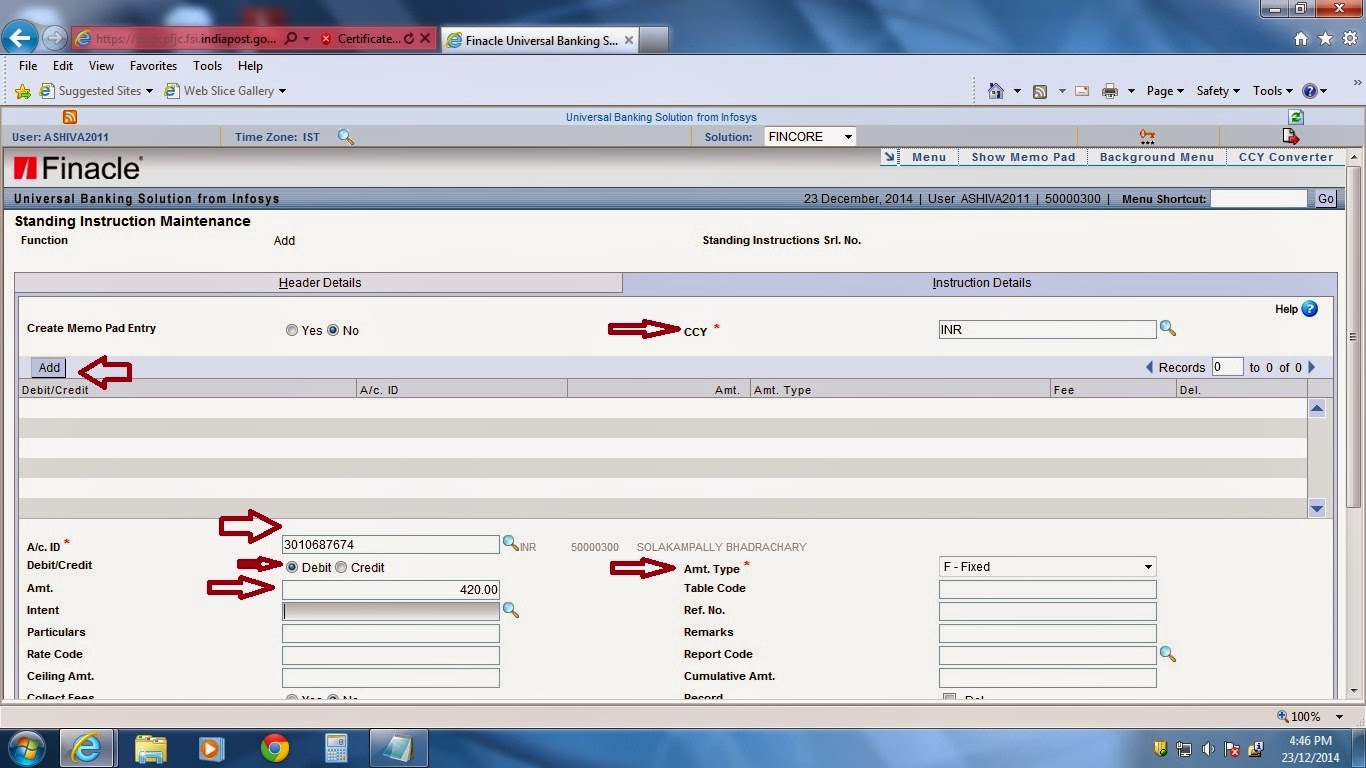
Then click on instruction details then the system will ask to enter the following

Debit Entry

  • Select the CCY filed as "INR"(Indian Rupee)
  • Enter the account id of the customer "SB account number of the customer"
  • Select the amt type field as "Fixed"
  • Select Debit/Credit field as "Debit"
  • Enter the amount field "as amount of RD amount" as shown
Then click on Add as shown then the system will ask to enter the following

Credit Entry

  • Select the CCY filed as "INR"(Indian Rupee)
  • Enter the account id of the customer "RD account number of the customer"
  • Select the amt type field as "Fixed"
  • Select Debit/Credit field as "Credit"
  • Enter the amount field "as amount of RD amount" as shown
Then finally click on submit then the system will generate the standing instruction number as shown
Then note down the instruction number and verify the same in the supervisor.

COURTESY:POFINACLE GUIDE

Friday, 10 June 2016

FIRST STAGE DEMONSTRATION ON 10/06/2016 AT OUR DIVISIONAL HQ

Dear comrades,

                         As per our CHQ call to settle the CBS and McCamish problems our divisional Union conduct a mass demonstration at our HO .Many of the comrades from HO only participated .I expect other member co-operation and support from other Sub offices in future also.


UNITY IS STRENGTH

UNITY IS STRENGTH
PROUD TO BE A NFPE MEMBER

DHARMAPURI DIVISION OFFICE PHONE NUMBERS !!!

SELECT OFFICE NAME


PHONE NUMBERS: